English
MetaTrader 5 Automated Trading Robot

SecureVolumeFlow MT5 Robot

Fully automated Expert Advisor for MetaTrader 5. Built on MT5's faster execution engine to deliver smart entries, dynamic stop management and structured risk controls — on autopilot.

$197 / year
1-Year License Regular Updates Priority Support
Get MT5 Robot - $197 Try Free for 14 Days

Automated trading involves significant risk. Past performance does not guarantee future results.

Key Features

Fully Automated Execution

The Expert Advisor opens, manages and closes positions automatically based on the SecureVolumeFlow volume flow strategy, optimized for MT5's faster engine.

Smart Risk Management

Built-in position sizing, fixed/percentage-based stop-loss, take-profit logic and configurable maximum daily loss limits to protect your capital.

Dynamic Trailing Stop

The robot trails open positions using the volume flow channel structure, locking in profit as the market moves in your favor.

Netting & Hedging Support

Works on both netting and hedging account modes natively supported by MT5 — the robot adapts its position handling logic automatically.

Live Dashboard Panel

On-chart panel showing trend direction, active positions, running P/L, total exposure, and daily statistics in real time.

Multi-Channel Alerts

Get notified about every trade opened, closed or modified via popup, sound, email or mobile push notifications.
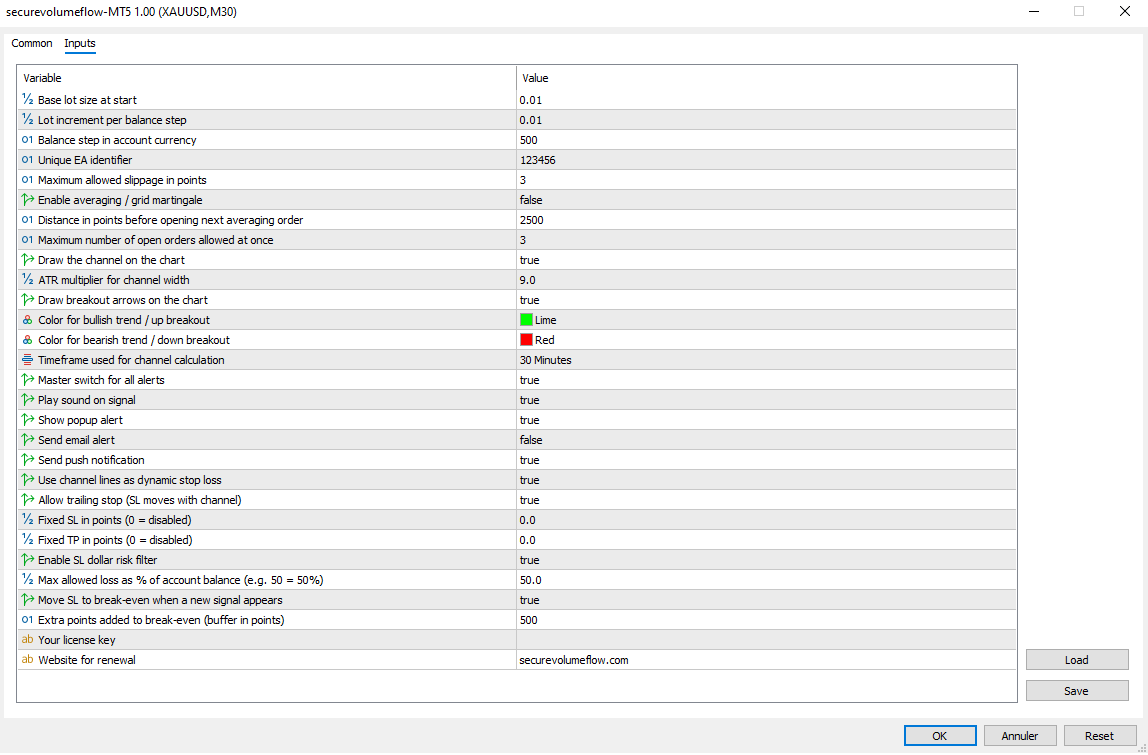
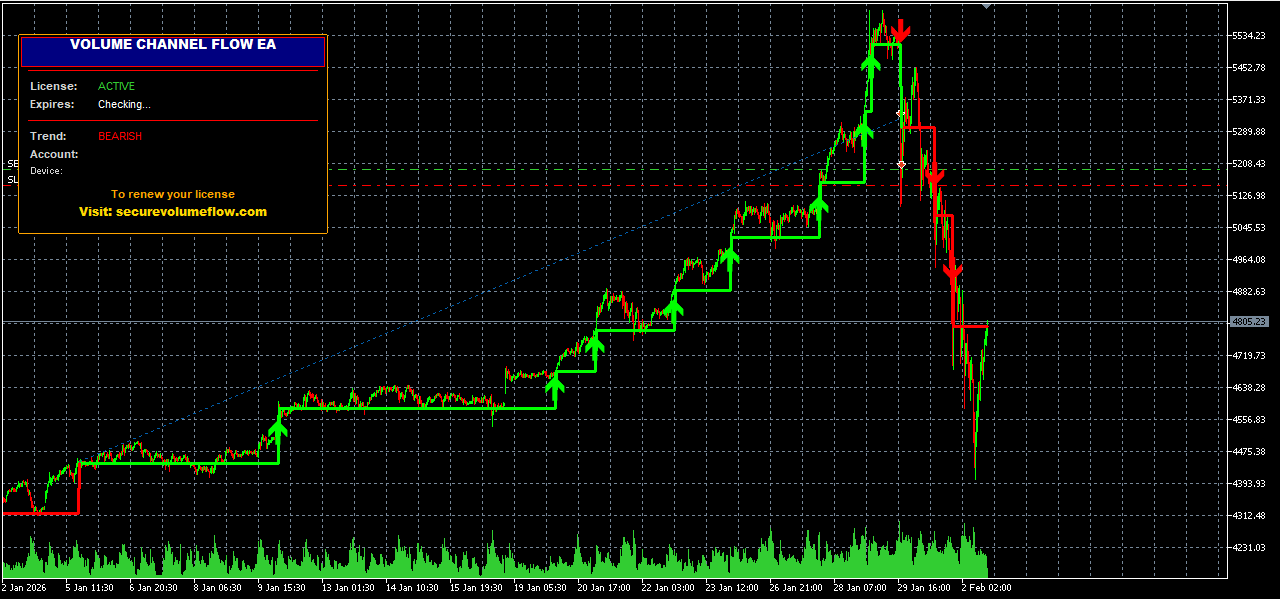
Robot in Action

Dashboard View

MT5 Robot Dashboard

Live Trades on Chart

MT5 Robot Live Trades

Video Demonstration

Technical Specifications

Platform
MetaTrader 5 (Build 1380+)
Product Type
Expert Advisor (EA) — automated trading robot (.ex5)
Strategy
Volume flow logic with structured channel breakouts and dynamic risk management
Recommended Timeframes
M30, H1, H4 (Optimized for H1)
Supported Symbols
Supports XAUUSD,XAGUSD,US30,US500,BTC...
Minimum Deposit
$500 recommended (lower deposits supported but increase risk)
Recommended Leverage
1:100 to 1:500
Account Type
Both netting and hedging accounts supported (Standard, ECN, Raw Spread)
License Type
Account-locked license with HWID binding — transferable after 90 days
Updates
Regular updates included during active license period

Frequently Asked Questions

How does the robot place trades automatically?
Once attached to a chart with AutoTrading enabled, the Expert Advisor continuously analyzes price action using the SecureVolumeFlow volume flow logic. When the strategy's entry conditions are met, the robot opens a position with predefined stop-loss and take-profit levels, and manages it until the exit conditions are triggered.
What's the difference between the MT4 and MT5 robots?
Both robots share the same core strategy. The MT5 version takes advantage of MT5's faster execution engine, supports both netting and hedging modes natively, and offers better backtesting accuracy via real tick data. Choose the one that matches your broker's platform.
Does the robot guarantee profits?
No. Automated trading involves significant risk and past performance is not indicative of future results. The robot is a tool that follows a defined strategy; market conditions, broker execution and chosen settings all affect outcomes. We recommend extensive demo testing before live use.
What minimum balance do I need?
We recommend a minimum deposit of $500 with a leverage of 1:100 or higher for proper risk distribution. Smaller accounts can be used but require more conservative settings (lower lot size, tighter risk per trade).
Does it work with prop firm / funded accounts?
The robot can be used on prop firm accounts in principle, but you must verify the prop firm's rules regarding EAs, news trading, and maximum daily loss. Configure the robot's risk parameters and trading hours to match the prop firm's restrictions before running it live.
Do I need a VPS to run the robot?
Strongly recommended. A VPS keeps your MT5 platform online 24/5 so the robot doesn't miss signals due to your PC being off, sleeping, or losing internet. Many brokers offer free VPS for active accounts, or you can use third-party providers.
How does the license system work?
Each license is bound to your trading account number and your device hardware. After purchase, you receive a unique license key valid for 1 year. The robot is activated through a secure validation process and can be transferred to another account or device after 90 days.
How do I install the robot?
Installation is simple: 1) Download the .ex5 file, 2) Place it in MT5's MQL5/Experts folder, 3) Restart MT5, 4) Drag the robot onto a chart, 5) Enable AutoTrading and configure your inputs. A detailed setup guide is included.

Ready to Automate Your MT5 Trading?

Let the SecureVolumeFlow MT5 Robot handle entries, exits and position management while you focus on strategy.

Get MT5 Robot Now - $197/year Try Free for 14 Days